A practical, step-by-step guide to installing and configuring the
rew62/enigma conky suite on a Debian-based system running MATE (or any X11 desktop).
It also covers the common “can’t open display” pitfall and
how to make the suite auto-start cleanly on every login.
What is Enigma?
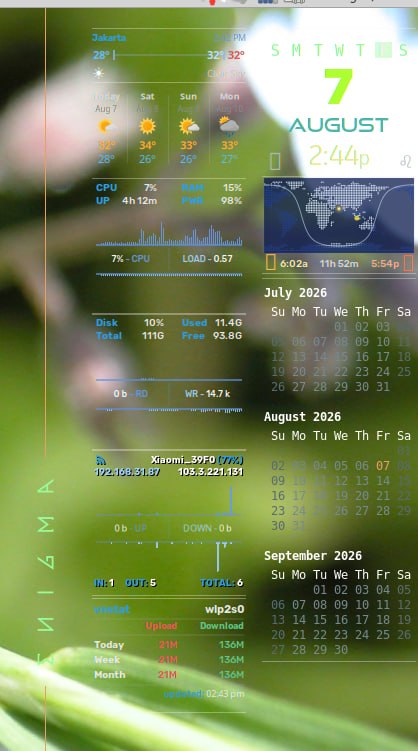
Enigma is a modular conky suite for Linux desktops. Each widget is a separate
conky process that runs inside a tmux session, so you can launch, stop, and rearrange
widgets independently. Out of the box it gives you:
- Arc (horizon, planets, sun/moon, weather)
- Multi-month calendar and a Lua calendar (espcal)
- Sweep ring clock and a solar dial ring
- Combined Net/Sys/Disk widget, network traffic panel, disk I/O monitor
- Earth satellite image viewer and a day/night world map
- Weather forecast (NWS for the US, Met.no fallback elsewhere)
- Now Playing with album art, spectrum EQ, and lyrics
- Stock indices and stock ticker
- Google Calendar month view, horoscope, and more
The repo is built and tested on Linux Mint 22.3 / Cinnamon, but it works on any
X11 desktop with conky-all 1.22.x. It needs conky compiled with Lua, Cairo, Mouse
events, ARGB visuals, Own window, Xft, and XDBE (double buffering).
1. Prerequisites
You’re going to need the following. Install them with apt:
sudo apt install -y --no-install-recommends \
    conky-all tmux fzf xdotool playerctl cava \
    imagemagick jq vnstat librsvg2-bin pulseaudio-utils \
    python3-ephem luarocks curl wget git ca-certificates \
    fonts-noto-core fonts-noto-color-emoji fonts-dejavu fonts-liberation
Quick heads-up if any package name isn’t available in your distro’s repos: the
author’s setup script also tries to install fonts-ibm-plex, which isn’t
in Debian’s default repositories. The bundled fonts shipped with the repo cover
essentially the same roles, so this is fine to skip.
Verify your conky has the required build features:
conky -v 2>&1 | grep -iE "cairo|mouse|argb|xft|own window|xdbe"
You should see Cairo, Mouse events, ARGB visual,
Own window, Xft, and XDBE all listed. If any are missing,
install the conky-all package or build conky from source with the
required flags.
2. Save your existing conky setup (if any)
If you already have a conky configuration you want to keep as a fallback, back
it up first:
BACKUP_DIR="$HOME/.conky_backup_$(date +%Y%m%d_%H%M%S)"
mkdir -p "$BACKUP_DIR"
cp -av "$HOME/.config/conky" "$BACKUP_DIR/conky_config"
cp -av "$HOME/.config/autostart/conky.desktop" "$BACKUP_DIR/" 2>/dev/null
[ -e "$HOME/.conkyrc" ] && echo "$HOME/.conkyrc -> $(readlink "$HOME/.conkyrc")" \
    > "$BACKUP_DIR/symlink_info.txt"
echo "INTERFACE=$(ls /sys/class/net | grep -v lo | head -1)" \
    > "$BACKUP_DIR/sysinfo.txt"
echo "BATTERY=$(ls /sys/class/power_supply/ | grep -iE 'BAT' | head -1)" \
    >> "$BACKUP_DIR/sysinfo.txt"
3. Clone the repository
By convention the suite lives at ~/.conky/enigma. That’s the
default lookup path baked into every widget, so leave it there unless you have a
good reason to move it.
mkdir -p ~/.conky
cd ~/.conky
git clone https://github.com/rew62/enigma.git
4. Configure the environment
Most widgets read keys and location from ~/.conky/enigma/.env. The
suite’s own enigma-config.sh will generate this file, but writing it
by hand is faster and easier to automate. The keys are:
OWM_API_KEY— OpenWeatherMap API key (free). Leave as
placeholder if you’ll only use the Met.no fallback.FINNHUB_API_KEY— FinnHub API key (free). Only needed for the
stock ticker widget.CITY_ID,LAT,LON— your location.
Jakarta, Indonesia: city ID1642911, lat/lon about
-6.2088, 106.8456.UNITS—metricorimperial.INTERFACE_NAME— your network interface (e.g.wlp2s0,
eth0). Check withip route | grep default.DISK_DEV— your disk device (e.g.sda,
nvme0n1). Check withlsblk -dno NAME,TYPE.
cat > ~/.conky/enigma/.env <<EOF
OWM_API_KEY=replace_me_openweathermap
FINNHUB_API_KEY=replace_me_finnhub
CITY_ID=1642911
UNITS=metric
LAT=-6.2088
LON=106.8456
INTERFACE_NAME=wlp2s0
DISK_DEV=sda
EOF
chmod 600 ~/.conky/enigma/.env
5. Install the bundled fonts
The widgets reference several display fonts that aren’t in the default
repositories. The repo ships them under fonts/; install them to your
user font directory and refresh the cache:
FONT_DIR="$HOME/.local/share/fonts"
mkdir -p "$FONT_DIR"
find ~/.conky/enigma/fonts -maxdepth 2 -type f \
    \( -iname "*.ttf" -o -iname "*.otf" \) -print0 \
  | while IFS= read -r -d '' src; do
        family=$(fc-query --format='%{family}\n' "$src" 2>/dev/null | head -n1)
        if [ -n "$family" ] && fc-list | grep -qiF "$family"; then
            echo "  skipped: $(basename "$src") [$family]"
        else
            cp "$src" "$FONT_DIR/$(basename "$src")"
            echo "  installed: $(basename "$src") [$family]"
        fi
    done
fc-cache -f "$FONT_DIR"
Verify the fonts are picked up:
fc-match "Orbitron"
fc-match "Oxanium"
fc-match "Barlow Condensed"
fc-match "MonaspiceNe Nerd Font"
6. The “can’t open display” problem
When you run etmux from a remote SSH session, a non-graphical
terminal, or directly from an autostart entry, conky will fail with
can't open display:. That’s because $DISPLAY and
$XAUTHORITY aren’t set in those contexts — conky needs them to know
which X server to draw on and which credentials to use.
On a typical laptop, the user session lives on display :0 with the
authority file at ~/.Xauthority. The fix is to set these env vars
before invoking etmux:
export DISPLAY=:0
export XAUTHORITY=/home/<your-username>/.Xauthority
~/.conky/enigma/etmux
Replace <your-username> with your actual account name
(helen in this guide’s example).
7. Patching etmux for headless launches
The repository’s etmux launcher ends with
tmux attach-session -t conky, which is meant to give you a live
windowed view of every widget. That’s nice when you launch from a terminal, but
it fails when the launcher is invoked from a non-interactive context (like the
graphical autostart system) because there’s no TTY to attach to.
Patch the final line of etmux so it only attaches when a TTY is
actually available:
if [ -t 0 ]; then
    tmux attach-session -t "$SESSION"
else
    echo "Suite launched in detached tmux session '$SESSION' (no TTY for attach)."
    echo "Run './etmux' from a terminal to attach."
fi
Leave the earlier attach-session inside the goto
subcommand alone — that path needs to attach so you can navigate to a specific
widget pane.
8. A reusable launcher script
Putting the env vars and idempotency into a small launcher keeps things tidy
and makes it easy to start the suite from any terminal.
mkdir -p ~/bin
cat > ~/bin/enigma <<'EOF'
#!/bin/bash
# Launch the Enigma conky suite with the user's X session env attached.
# Idempotent: if a previous suite is already running, tear it down first.
ENV_FILE="/home/<your-username>/.conky/enigma/.env"
[ -f "$ENV_FILE" ] && set -a && . "$ENV_FILE" && set +a

if tmux has-session -t conky 2>/dev/null; then
    /home/<your-username>/.conky/enigma/etmux quit >/dev/null 2>&1
    sleep 1
fi

pkill -u "$(id -u)" -f "conky -c" 2>/dev/null
sleep 1

exec /home/<your-username>/.conky/enigma/etmux "$@"
EOF
chmod +x ~/bin/enigma
After this, from any terminal you can simply type:
enigma             # launch the default group
enigma quit        # stop everything
enigma help        # list all widgets and groups
9. Autostart on every login
The MATE desktop (and GNOME, XFCE, Cinnamon) honours XDG autostart entries in
~/.config/autostart/. Drop a .desktop file in there to
have the suite launch on every login:
cat > ~/.config/autostart/conky.desktop <<EOF
[Desktop Entry]
Type=Application
Name=Conky (Enigma)
Comment=Enigma conky suite (default group, no horoscope)
Exec=env DISPLAY=:0 XAUTHORITY=/home/<your-username>/.Xauthority /home/<your-username>/bin/enigma
Icon=conky
Terminal=false
Categories=System;Monitor;
X-GNOME-Autostart-enabled=true
Hidden=false
EOF
The env DISPLAY=:0 XAUTHORITY=... prefix is what makes this work
reliably at login time, when the desktop environment hasn’t yet propagated those
variables to the autostart child process.
10. Choosing what runs
By default etmux launches the default group, which
is 15 widgets:
c e ec ed em en es ev g m si wf wt zen zkr
Mapping those codes to widgets:
| Code | Widget |
|---|---|
| c | Multi-month calendar |
| e | Earth satellite image viewer |
| ec | Lua calendar (espcal) |
| ed | Disk I/O monitor |
| em | Day/night world map |
| en | Network traffic panel |
| es | System monitor |
| ev | vnstat bandwidth summary |
| g | Google Calendar month view |
| m | Now Playing (music2) |
| si | Stock indices |
| wf | Weather forecast strip |
| wt | Temperature bar |
| zen | ENIGMA logotype |
| zkr | Killroy Was Here |
Notice that the h code (horoscope) is not in the default
group. If you want even fewer widgets, or you want to add specific ones, just pass
the codes as arguments:
~/bin/enigma t c wf wt    # ring clock, calendar, weather forecast, temperature bar
~/bin/enigma stack1       # named group: a sd st r t zkr
~/bin/enigma help         # full list of codes and groups
11. Quick troubleshooting
Suite launches but nothing appears on the desktop.
Confirm the widgets can actually open the display:
DISPLAY=:0 XAUTHORITY=$HOME/.Xauthority conky -c ~/.conky/enigma/widgets/multimon.rc
If you see can't open display, the env vars aren’t reaching the
widget. Re-check the autostart entry and the ~/bin/enigma launcher.
Some widgets show “no data” or empty fields.
Most likely an .env placeholder that wasn’t filled in. The weather
widgets, world map, and sun/moon calculations all need a real
LAT/LON.
Fonts look wrong.
Confirm the bundle was installed:
fc-match "Orbitron"      # should resolve to Orbitron, not Noto Sans
fc-match "Oxanium"       # should resolve to Oxanium
If they fall back to Noto, run fc-cache -f as your user and retry.
tmux session “conky” already exists.
You tried to launch a second suite while one was already running. Either run
enigma quit first, or use the launcher in
~/bin/enigma which handles this automatically.
Widgets flicker or look low-contrast.
The bundled sample-luma.sh script tries to read the desktop
wallpaper luminance to pick a transparent or opaque theme. If it can’t reach
the wallpaper daemon (e.g. on a fresh MATE session), it defaults to transparent.
Forcing /dev/shm/conky/enigma_luma=0.0 gives a transparent look;
setting it to 1.0 gives the opaque theme. Make
/dev/shm/conky writable if you want the script to write it:
sudo mkdir -p /dev/shm/conky
sudo chmod 1777 /dev/shm/conky
Recap
- Install the apt dependencies; verify conky has all required build features.
- Back up your existing conky config if any.
- Clone the repo to
~/.conky/enigma. - Write
~/.conky/enigma/.envwith your location and API keys. - Install the bundled fonts and refresh the font cache.
- Patch
etmuxso it doesn’t crash when launched without a TTY. - Add a reusable
~/bin/enigmalauncher that sets
DISPLAYandXAUTHORITY. - Drop a
.desktopfile into~/.config/autostart/
using that launcher.
After that, the suite starts on every login, with the default group of 15
widgets ready to go, and you can fine-tune which ones to run from any terminal
with enigma <codes...>.